How to Run HeyReach With Rented and Avatar LinkedIn Accounts at Scale in 2026
HeyReach is one of the few LinkedIn automation tools built for agencies running many accounts at once, and it supports custom proxies. Here is how to pair it with rented and avatar accounts safely, and the account layer that keeps a fleet of senders healthy underneath it.
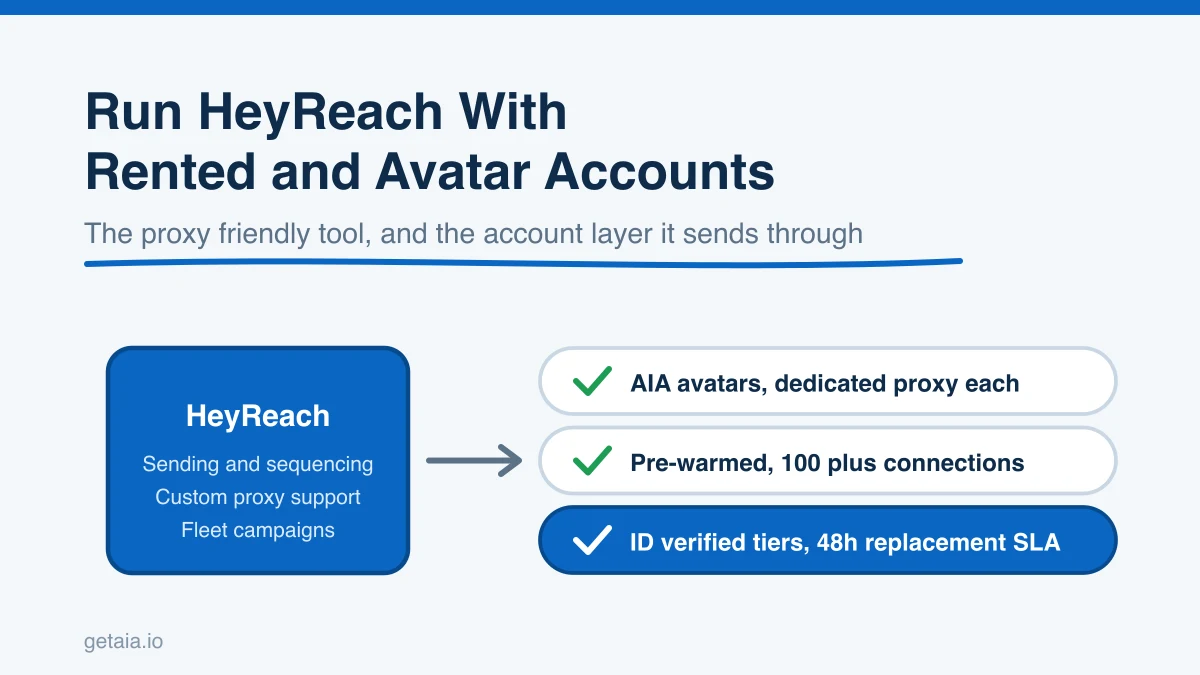
HeyReach earns its reputation for one reason that matters more than any feature list: it was built from the start to run many LinkedIn accounts as a single fleet, not to run one seat and then bolt on extras later. If you sell outreach as a service, or you run a large in-house sending operation, that agency-first design is exactly what you want. But the tool is only half of the equation. HeyReach sends the messages. Something still has to supply the accounts those messages send from, keep them healthy, and replace them when LinkedIn restricts one. That account layer is where most teams either scale cleanly or quietly stall.
This guide covers why HeyReach is a strong choice for running rented and avatar accounts, the one setting that keeps a fleet safe, and how to pair it with an account layer that actually holds up at fifty or a hundred senders.
Why HeyReach Works For Rented And Avatar Accounts
Most LinkedIn automation tools are built around a single profile you own and log into from your own connection. The moment you try to run rented, aged, or avatar accounts through them, they fight you. HeyReach is different in the two places that count.
The first is custom proxy support. To run multiple LinkedIn accounts safely, each account needs to look like a separate real person in a consistent location. That means a dedicated proxy per account, so every profile keeps its own stable IP and signs in from the same place every time. Rented and avatar accounts need to sign in from one consistent IP every time. HeyReach lets you assign a proxy per account, which means you can pin each account to a proxy of your own instead of forcing it through a shared or shifting connection. That is the difference between an account that keeps sending and an account that gets flagged in a week.
The second is scale shape. HeyReach prices and designs around a coordinated fleet with a shared inbox, fleet-level limits, and unlimited senders on its higher plans, rather than charging you a growing per-seat fee for every account you add. When the number of sending accounts is the thing that drives revenue, you want a tool where adding accounts does not linearly add cost or chaos. That is the model HeyReach is built for.
So HeyReach clears the two bars that most tools fail. The open question is not whether HeyReach can run rented accounts. It is where those accounts come from and who keeps them healthy.
The Part HeyReach Does Not Solve: The Account Layer
Here is the trap teams fall into. They pick a great tool like HeyReach, then try to feed it accounts they bought cheaply somewhere or profiles they are warming by hand. Both paths break at scale.
Cheap purchased credentials tend to arrive cold, with no connections, no history, and no proxy that matches, so they get restricted almost immediately once you start sending. Warming fresh profiles by hand works, but it takes weeks per account and does not scale to a fleet of a hundred. Either way, you end up with a world-class sending tool starved of healthy accounts to send from.
That is the layer AIA avatars provide. Instead of buying disposable credentials or spending weeks warming profiles, you rent a managed account layer that plugs straight into HeyReach. Each avatar arrives pre-warmed with 100 or more connections and is ready to run inside safe limits from day one. When a profile does get restricted, and across a large fleet some always will, the 48 hour replacement warranty swaps it out so your HeyReach campaigns keep moving instead of stalling on a dead sender.
The AIA integrations page shows exactly how avatar accounts connect to HeyReach and the other proxy friendly tools, so you can see the wiring before you commit.
How To Set It Up Safely
The setup that keeps a HeyReach fleet healthy comes down to a few disciplined choices.
- One dedicated proxy per account. Assign one proxy to each avatar inside HeyReach and keep that pairing stable. Never share a proxy across profiles.
- Conservative daily limits. Keep connection requests and messages per account well inside human ranges, especially in the first weeks. HeyReach lets you cap this per account, so use it.
- Warm accounts only. Send from accounts that already carry real connections and history. Pre-warmed avatars skip the cold start that gets fresh profiles flagged.
- Verification on your top senders. Put your highest-value outreach on ID verified profiles so the accounts doing the most sending carry the strongest trust signal.
- A replacement plan. Assume some accounts will be restricted and have healthy replacements ready, so a single restriction never pauses a campaign.
Get those five right and HeyReach becomes what it is designed to be: a fleet-scale sending engine running on top of a fleet-scale account layer.
What The Account Layer Costs
The AIA tiers are transparent and monthly rather than a per-seat fee that only grows with every account you add:
- Gold at $147 per profile per month, ID verified
- Titanium at $197 per profile per month, ID verified
- Silver at $97 per profile per month
- Platinum at $177 per profile per month
Volume discounts of 10, 20, and 30 percent kick in at 10, 50, and 100 or more avatars, so the account layer gets cheaper as you scale rather than more expensive. There are also pre-warmed email avatars at $11 per domain if you want to run the multi-channel sequences that pairing HeyReach with email makes possible. You can see the full breakdown on the AIA pricing page.
Why ID Verification Matters On Cold Outreach
When you send to people who have never heard of you, trust signals move reply rates. A profile carrying a genuine verification badge gets more requests accepted and more messages answered than an unverified one. The ID verified tiers, Gold and Titanium, build that badge into the account layer itself, so your highest-value HeyReach senders lead with credibility. Because the accounts are managed rather than resold credentials, that verification is part of the infrastructure you rent, and if a profile is ever replaced, the replacement comes verified too.
What Scaling This Way Actually Looks Like
Here is the practical picture. Say you want to run 100 sending accounts through HeyReach.
Run 100 AIA avatars on the Silver tier with the 30 percent volume discount and it is $97 times 0.70 times 100, which is $6,790 per month, with dedicated proxies and replacements included. Compare that to buying 100 cheap accounts that arrive cold and get restricted in their first week, or warming 100 profiles by hand over months. The avatars arrive pre-warmed, so you skip the warming entirely, and HeyReach handles the campaigns on top of a steady supply of healthy senders.
This is not theory. A top 100 US agency, running as an AIA client, ran 185 avatars and generated more than 500 SQLs and $2.3M in net-new revenue in under 90 days. That output does not come from a handful of cold accounts. It comes from a large, healthy, replaceable fleet feeding a proxy friendly outreach tool exactly like HeyReach.
The Honest Note On Platform Risk
No tool and no account model removes platform risk. LinkedIn actively works to detect automation and will restrict accounts that push too hard, whether you run HeyReach, Expandi, or anything else. Anyone promising unbannable accounts is not being straight with you. What reduces the risk is careful daily limits, warm accounts, a dedicated proxy per profile, and ID verification on your top senders. What contains the risk when a restriction still happens is the 48 hour replacement warranty. HeyReach gives you the proxy control and fleet management. A managed account layer gives you both the mitigation and the containment.
Getting Started
If HeyReach is your sending tool, the last piece is an account layer built to scale with it. The setup guide walks you from zero to a running fleet, and the AIA integrations page shows how the avatars connect into HeyReach.
Want a fast recommendation on how many standard or ID verified profiles fit your HeyReach setup? Message us on WhatsApp at wa.me/37256084933 and we will size it with you. You can also start from the homepage at getaia.io to see how the whole account layer fits together.
Ready to feed HeyReach a fleet that actually scales? Visit app.getaia.io to place your order, or start with the AIA pricing page to size your fleet and lock in volume discounts before you commit.