How to Start a LinkedIn Lead Generation Agency Without Burning Through Sending Accounts
A step-by-step guide to starting a LinkedIn lead generation agency, from picking a niche and pricing your retainer to building the account layer that keeps client campaigns running without constant restrictions.
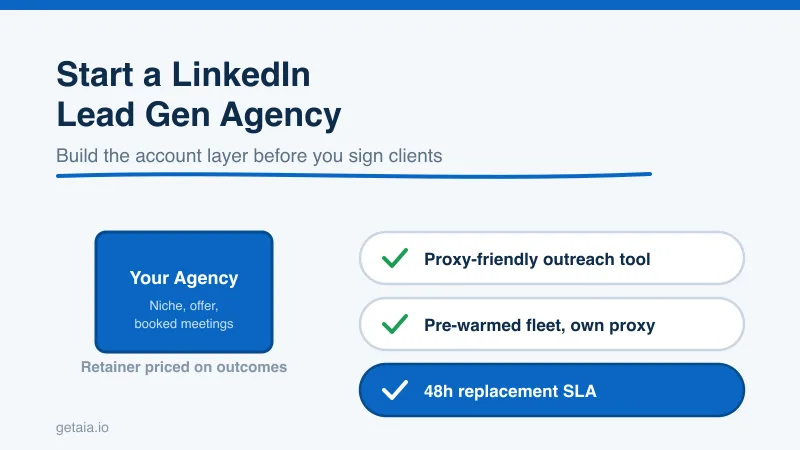
Starting a LinkedIn lead generation agency is one of the cheapest service businesses you can launch. You do not need inventory, an office, or a big team. You need a niche, a repeatable outreach process, and a way to keep sending accounts healthy at scale. Most people get the first two right and then quietly go out of business on the third, because the accounts doing the actual sending keep getting restricted and the client campaigns keep going dark.
This guide walks you through the whole thing in order: how to pick who you serve, how to price the work, what tools you actually need, and how to build the one layer that most new agencies underestimate. Get this right and you have a business with real margins. Get it wrong and you have a treadmill of banned profiles and refund requests.
Step 1: Pick a Narrow Niche and a Clear Offer
The fastest way to fail is to sell “LinkedIn lead generation” to everyone. Generic offers are impossible to price, impossible to write copy for, and impossible to prove results on. Pick a narrow vertical you can speak to fluently: fractional CFOs selling to Series A startups, commercial roofers selling to property managers, cybersecurity vendors selling to mid-market IT directors. The narrower the niche, the sharper your messaging, the higher your reply rates, and the easier your case studies convert the next client.
Your offer should be a single measurable outcome, not a bundle of activities. Clients do not buy connection requests or messages sent. They buy booked meetings with qualified prospects. Frame your deliverable that way from day one, because it is the number you will be judged on and the number that justifies your retainer.
Step 2: Price for Booked Meetings, Not Effort
New agencies almost always underprice because they think about their own time instead of the client’s outcome. A single qualified sales meeting can be worth thousands to your client depending on their deal size. Price against that value.
A durable model has two parts. Charge a monthly retainer that covers your management, copywriting, and reporting, then treat the account layer underneath as your cost of goods. If you know exactly what the sending accounts cost you per month, you can quote a retainer with confidence and protect your margin. The agencies that struggle are the ones whose account costs are unpredictable, because every restricted profile and every emergency replacement eats into a number they already promised the client.
That is why the account layer is not a detail. It is the thing that decides whether your pricing holds up month after month.
Step 3: Build Your Tool Stack
You need three moving parts to run campaigns:
- A lead source. LinkedIn Sales Navigator is the standard for building targeted prospect lists by title, industry, company size, and geography. Budget one Sales Navigator seat per sourcing account.
- An outreach tool. This is the software that actually sends connection requests and messages on a schedule. Proxy-friendly cloud tools like Expandi, HeyReach, Skylead, We-Connect, Buzz, and LinkedIn Automation Agency (LIA) are built for running many accounts safely because they let each account sign in from its own dedicated proxy. Avoid tools that cannot use a custom proxy, such as Dripify, Waalaxy, Zopto, Dux-Soup, and Ulinc, because they route your accounts through shared or fixed infrastructure that does not hold up when you run a fleet on behalf of clients.
- A place to track meetings. A simple CRM or shared sheet is enough at the start. The client wants a report that says meetings booked, not a tour of your tooling.
None of these three is the hard part. The hard part is the fourth layer sitting underneath all of them, and it is the one that separates agencies that scale from agencies that stall.
Step 4: Build the Account Layer That Actually Scales
Here is the reality nobody tells you when you start. The tool that sends messages is only as good as the LinkedIn accounts you feed it. When you have one client, you can run outreach from a couple of profiles and manage them by hand. The moment you have five clients, you need dozens of separate, healthy sending accounts, each isolated from the others, each warm enough to send inside safe limits, and each replaceable when LinkedIn restricts it. Trying to spin those up manually is where new agencies drown.
This is exactly what AIA avatar accounts are built for. Instead of buying random aged profiles off a marketplace and hoping they survive, you rent managed avatar accounts that come ready to work. If you want the full picture of why a managed account layer beats stitching together bought credentials, the why AIA avatars page lays it out. Each avatar arrives pre-warmed with 100 or more real connections, so it can send inside safe daily limits from day one instead of after weeks of hand warming. Each one is a separate identity you attach to its own proxy, so every client’s accounts sign in from their own stable IP and stay cleanly separated from every other client. And when a profile does get restricted, the 48-hour replacement SLA swaps it out fast, so a client’s campaign barely notices instead of going dark for two weeks.
Because these are managed accounts rather than resold logins, you are renting infrastructure you can plan around, not gambling on a listing that might vanish. You decide how many seats each client gets, you point your proxy-friendly outreach tool at them, and the supply underneath stays healthy as you grow.
Step 5: Make the Account Layer a Predictable Line Item
The reason a managed account layer matters so much to a new agency is that it turns your biggest hidden cost into a fixed, quotable number. AIA prices each profile as a flat monthly figure:
- Gold at $147 per profile per month, ID verified
- Titanium at $197 per profile per month, ID verified
- Silver at $97 per profile per month
- Platinum at $177 per profile per month
Volume discounts of 10, 20, and 30 percent kick in at 10, 50, and 100 or more avatars, which is perfect for an agency because your account count only rises as you sign clients. Your cost per seat drops exactly as you scale, so your margin widens instead of thinning. There are pre-warmed email avatars at $11 per domain if you want to pair LinkedIn with cold email for multi-channel sequences. You can see the full breakdown on the AIA pricing page.
Run the math on a starter book. Say you land five clients at six sending accounts each, so 30 avatars. On the Silver tier with the 20 percent volume discount, that is $97 times 0.80 times 30, which is $2,328 per month for your entire account layer, dedicated proxies and replacements included. If each client pays you a couple thousand a month for managed outreach, the account supply is a small, predictable slice of revenue rather than a source of surprise costs. That predictability is what lets you quote new clients without flinching.
Step 6: Lead With ID Verification on Premium Clients
When you send cold on a client’s behalf, trust signals move reply rates, and reply rates are the number your client actually watches. A profile carrying a genuine verification badge gets more requests accepted and more messages answered than an unverified one. The ID-verified tiers, Gold and Titanium, build that badge into the account itself, so your highest-value campaigns lead with credibility. Because the accounts are managed, any replacement comes verified too, so a restriction never costs a client their trust badge.
For a new agency this is a lever you can sell. Offer premium clients a fleet of ID-verified senders and you have a tangible upgrade tier that justifies a higher retainer, right out of the gate.
What Good Looks Like at Scale
This is not theory. A top-100 US agency, running as an AIA client, ran 185 avatars and generated more than 500 SQLs and $2.3M in net-new revenue in under 90 days. That output does not come from a handful of hand-warmed profiles. It comes from a large, healthy, replaceable fleet feeding proxy-friendly outreach tools, which is exactly the structure a serious agency needs once it moves past its first few clients.
The Honest Note on Platform Risk
No account model removes platform risk, and you should never sell one that claims to. LinkedIn actively works to detect automation and will restrict accounts that push too hard, no matter whose tool or accounts you use. Anyone promising unbannable profiles is not being straight with you or your clients. What reduces the risk is careful daily limits, warm accounts, a dedicated proxy per profile, and ID verification on your top senders. What contains the risk when a restriction still happens is the 48-hour replacement SLA. A managed account layer gives you both the mitigation and the containment, which is what lets you make client promises you can actually keep.
Getting Started
If you are starting a LinkedIn lead generation agency, sequence it like this. Pick a narrow niche, define one measurable outcome, price against the value of a booked meeting, then choose a proxy-friendly outreach tool and give it an account layer built to scale per client. The AIA integrations page shows how avatar accounts connect to the major proxy-friendly tools, and the setup guide walks you from zero to a running fleet.
Want a fast recommendation on how many standard or ID-verified profiles fit your first few clients? Message us on WhatsApp at wa.me/37256084933 and we will size it with you. You can also start from the homepage at getaia.io to see how the whole account layer fits together.
Ready to build your agency on an account layer that actually holds up? Visit app.getaia.io to place your order, or start with the AIA pricing page to size your fleet and lock in volume discounts before you sign your first client.